Polar Integration - Access Tokens & Webhooks
Learn how to securely configure Polar Organization Access Tokens (OAT) and set up webhooks for real-time event notifications, including local development with ngrok or cloudflared tunnels.
1. Polar Access Token (POLAR_ACCESS_TOKEN)
Polar Organization Access Tokens (OAT) are used to authenticate your backend with the Polar API. These tokens are tied to your organization and should be kept private—never expose them in client-side code.
How to Generate a Polar Access Token
- Go to your Polar dashboard and navigate to Settings > General for your organization.
- Scroll down to the Developers section and click New Token.
- Configure the token:
- Name: Choose a descriptive name for the token.
- Expiration: Set how long the token should be valid.
- Scopes: Select the permissions your integration needs.
- Copy the generated token and store it securely.
Setting the Token in Your Environment
Add the token to your .env file as POLAR_ACCESS_TOKEN:
POLAR_ACCESS_TOKEN=your-polar-access-tokenℹ️ For more details, see the Polar OAT documentation.
2. Setting Up Polar Webhooks
Polar webhooks allow your app to receive real-time notifications about events like purchases, subscriptions, and cancellations. Here’s how to set up and test webhooks with Polar:
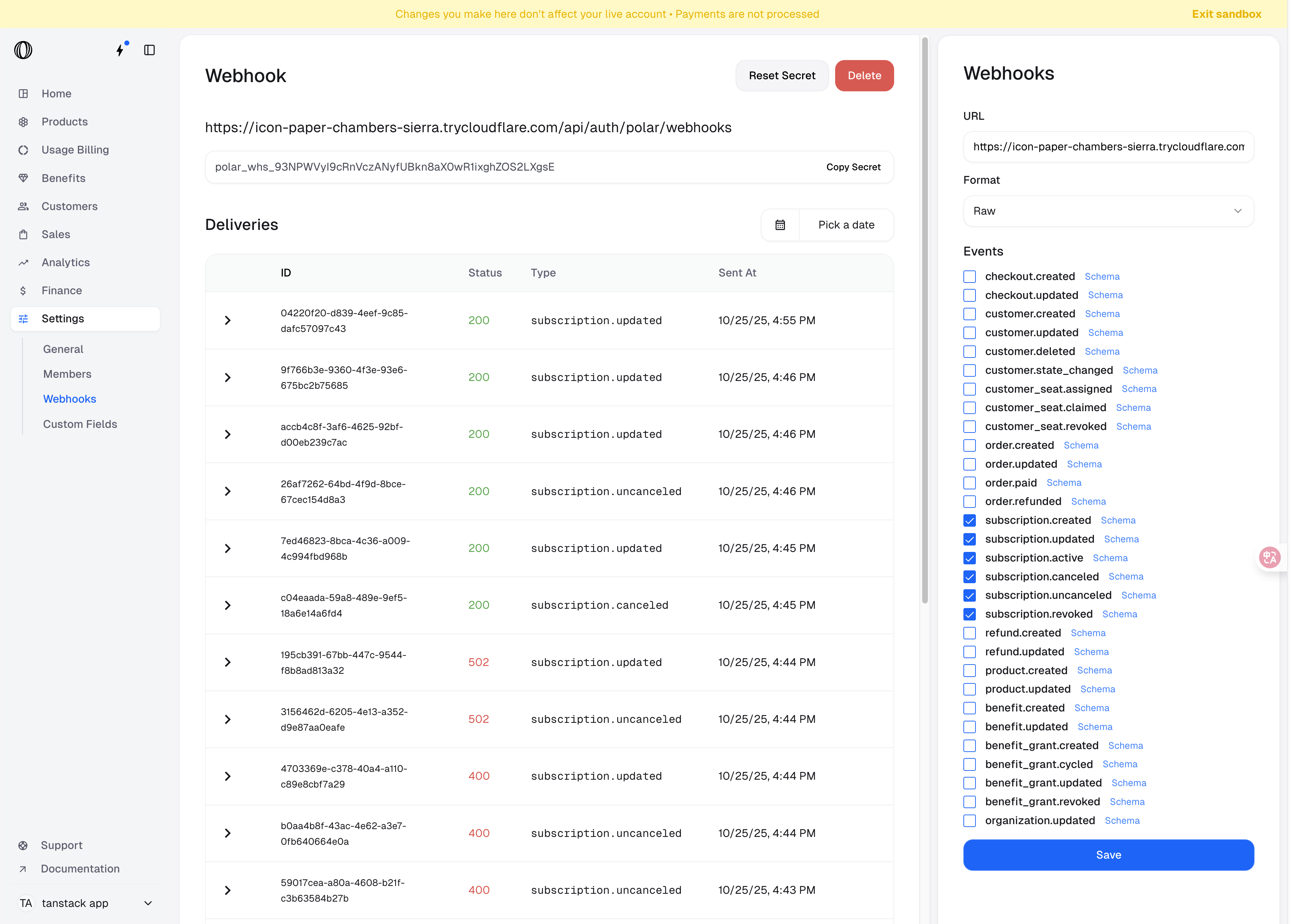
Add a New Webhook Endpoint
- Go to your Polar organization settings.
- Click the Add Endpoint button to create a new webhook.
Specify Your Endpoint URL
- Enter the URL where you want to receive webhook events.
- For production, use your deployed API endpoint (e.g.
https://yourdomain.com/api/auth/polar/webhooks).
Local Development
To test webhooks locally, use a tunneling tool like ngrok or cloudflared. This exposes your local server to the internet.
Example with ngrok:
ngrok http 3000Example with cloudflared:
cloudflared tunnel --url http://localhost:3000-
Copy the public URL provided by ngrok or cloudflared and use it as your webhook endpoint in Polar (e.g.
https://random-id.ngrok.io/api/auth/polar/webhooks). -
For convenience, set this URL in your
.envfile asPOLAR_WEBHOOK_URL_DEV:POLAR_WEBHOOK_URL_DEV=https://random-id.ngrok.io
Choose a Delivery Format
- For most integrations, select Raw to receive JSON payloads.
- If you want to send notifications to Discord or Slack, select the corresponding format.
Set a Secret
- Enter a secret string or generate a random one in the Polar dashboard.
- This secret is used to sign webhook requests, allowing you to verify their authenticity in your backend.
- Set the same value in your
.envfile asPOLAR_WEBHOOK_SECRET:POLAR_WEBHOOK_SECRET=your-polar-webhook-secret - See the Polar docs on webhook secrets for more details.
Subscribe to Events
- Select the events you want to receive (e.g. purchase, subscription, refund).
- Save your webhook endpoint.
Tip:
For more details, see the official Polar webhook docs.